When a rental fleet is scattered across Dubai and operations run on calls and guesswork, money leaks every minute. SWAPPZ rents electric bikes and scooters to delivery fleets in the UAE. As the fleet grew, the gaps became impossible to ignore.
WAPP built one operational layer for fleet owners, couriers, and service teams — a custom fleet management system matched to real Dubai field work, not a generic SaaS adapted to fit.
3 mo
from idea to MVP
5
distinct user roles
100%
fleet visibility
Logistics
domain focus
01. Problem
Fleet owners had limited visibility, couriers spent time searching for available units, and technicians were informed about failures too late.
SWAPPZ operates a rental fleet of electric bikes and scooters across Dubai. As the fleet grew, the operational gaps became impossible to ignore.
Fleet owners had no single source of truth. They relied on phone calls and manual spreadsheets to track unit availability — a system that broke down under scale. When a bike was reported stolen, they often found out hours after it left the designated zone. When a scooter broke down, the technician arrived without knowing the fault history, wasting time on-site diagnosing what could have been pre-diagnosed remotely.
The courier layer had its own problems. Riders spent the beginning of each shift physically searching for available units. No app, no map, no status feed — just walking and calling.
The business was growing, but the operations were not built for growth. SWAPPZ needed a custom fleet management system that matched the complexity of their real-world processes — not a generic SaaS tool adapted to fit.
The core requirements were clear:
- Real-time visibility of every unit in the fleet
- Strict role separation — owners, admins, technicians, and couriers each needed a different interface
- Mobile-first tools for field staff
- A B2B dashboard for investors and company owners with clean KPI reporting
- The ability to scale without rebuilding the architecture
02. Solution
Role model and permissions
Designing the role model was the first and most critical architectural decision. Get it wrong, and you end up with either a security gap (couriers seeing owner data) or a usability failure (technicians buried in irrelevant menus).
We mapped every workflow before writing a single line of code. Five roles, each with a distinct job and a distinct interface:
- Super-admin — full system access, manages all operators and locations
- Admin — manages a single operator’s fleet, users, and reports
- Owner — read-only B2B dashboard, sees fleet KPIs and financial metrics
- Technician — mobile app with service queue, unit history, and navigation
- Courier — mobile app for finding units, starting rentals, and reporting issues
Permissions are enforced at the API level — not just hidden in the UI. A courier token cannot request owner-level data, regardless of how the client is built.
Role model and permissions
Multi-role architecture with strict permissions: courier, technician, owner, admin, and super-admin.
B2B owner dashboard
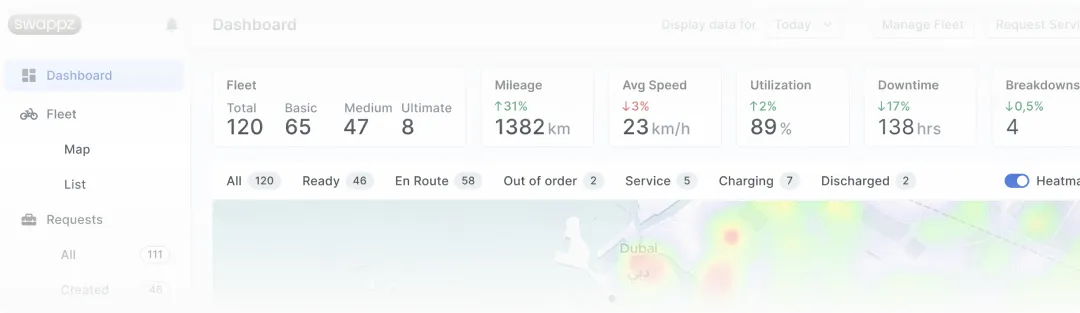
The owner dashboard was designed for one purpose: give the business owner a complete picture of fleet health in under 30 seconds.
The interface surfaces three layers of data simultaneously:
- Fleet status — how many units are active, idle, in service, or flagged. Colour-coded map overlay with unit-level drill-down. Owners see where every asset is right now.
- Service KPIs — average response time per technician, open service tickets, units cleared in the last 24 hours. Before this system, SWAPPZ had no reliable way to measure technician efficiency.
- Theft and incident tracking — units that leave a defined geofence trigger an alert. The owner sees the event log, timestamp, and last known location. Combined with real-time GPS, rapid response became possible for the first time.
This dashboard became a tool not only for daily operations, but for investor reporting. Clean, exportable data replaced monthly manual summaries.
Fleet control center
A single dashboard with fleet status, service KPIs, and real-time tracking across all units.
Requirements and scenarios
Before development we locked workflows for every role: routes, unit statuses, service handoffs, and rental start/end. That map became the specification — and it did not thrash mid-build.
Unit management
Every asset in the fleet gets its own digital record — an asset card that travels with the unit for its entire operational life.
The asset card contains:
- Current status (available, rented, in service, flagged)
- Full rental history with timestamps and courier IDs
- Maintenance event log with technician notes
- Reported issues with photo attachments
- GPS location history
When a technician is dispatched to repair a unit, they arrive already knowing what was reported, what was fixed last time, and what parts may be needed. That reduced average on-site repair time and removed the “I wasn’t told about this problem” loop between couriers and technicians.
Unit management also allows bulk operations — admins can update status for multiple units, flag a batch for scheduled maintenance, or temporarily remove units from the available pool without deleting them from the system.
Asset card and condition tracking
A dedicated unit-level page with status, rental history, maintenance events, and current condition.
Technician app
Field technicians are the operational backbone of any fleet. Their tool needs to be fast, offline-capable, and focused — not a stripped-down admin panel.
The technician app delivers:
- Service queue — tasks assigned by the admin, sorted by priority and distance. No more dispatch calls. The technician opens the app and sees what needs doing and in what order.
- Navigation integration — one tap routes to the failed unit’s last GPS position. No copy-pasting coordinates into a maps app.
- Repair logging — fault type, repair performed, parts used, and time spent. Data feeds the unit’s asset card and the admin KPI dashboard in real time.
- Offline mode — the app caches the service queue and unit data locally. If connectivity drops in the field, tasks and repair logs still work. Data syncs when connection returns.
Service workflow automation
Technicians receive exact failed-unit coordinates and maintenance history to reduce response time.
Courier app
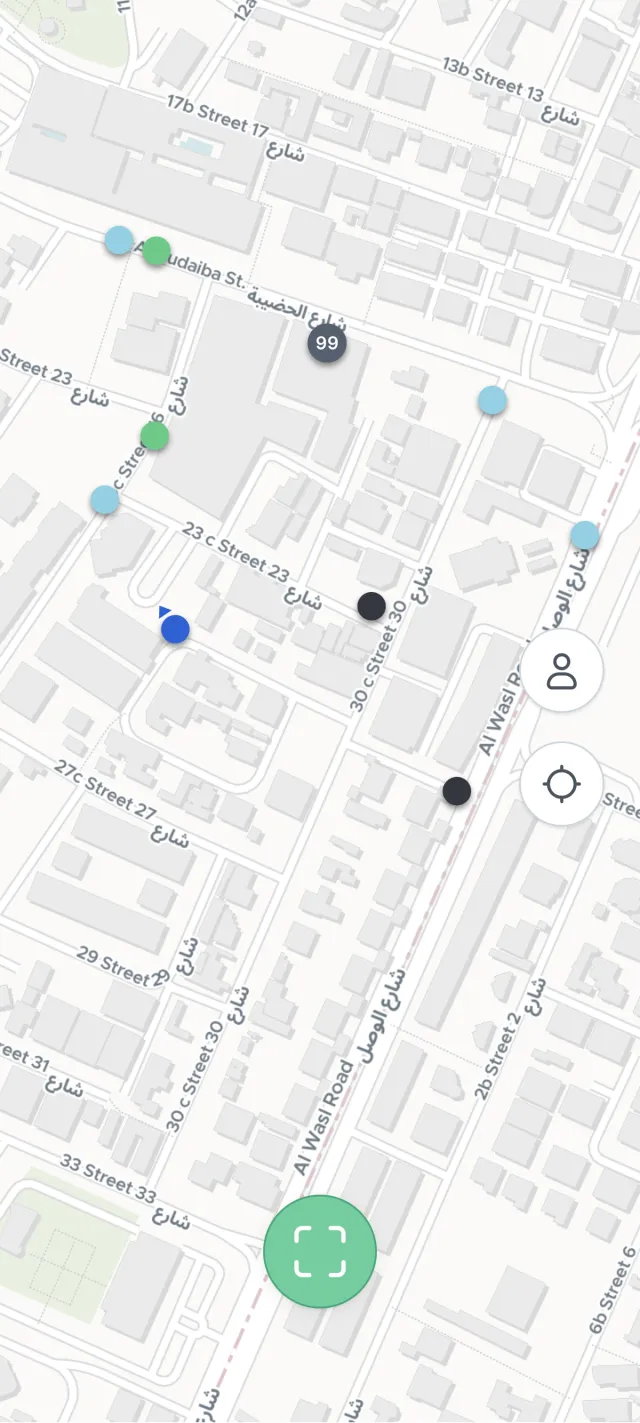
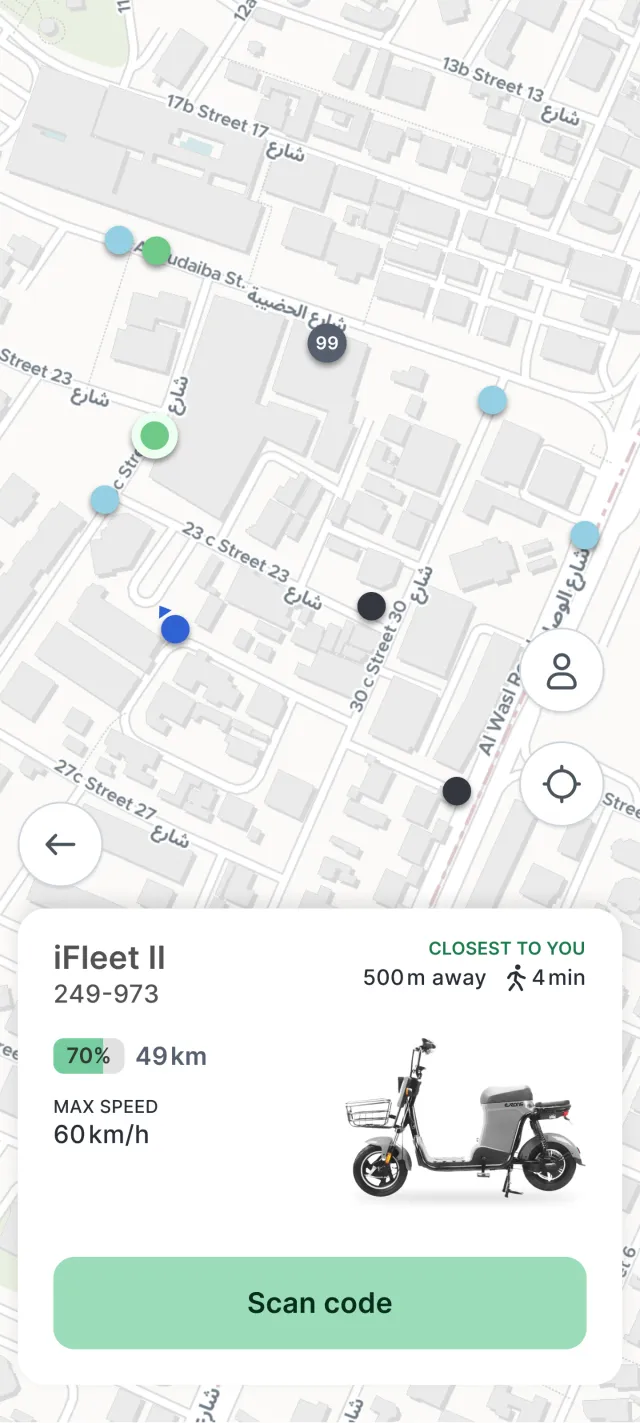
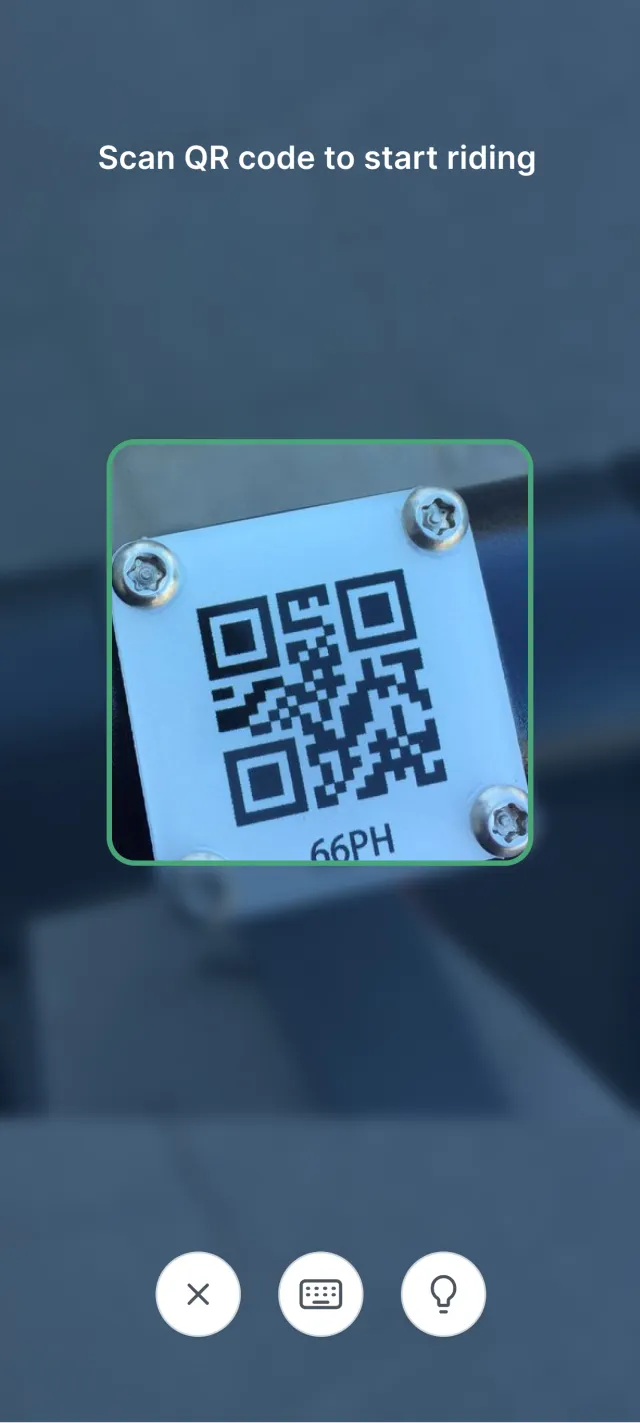
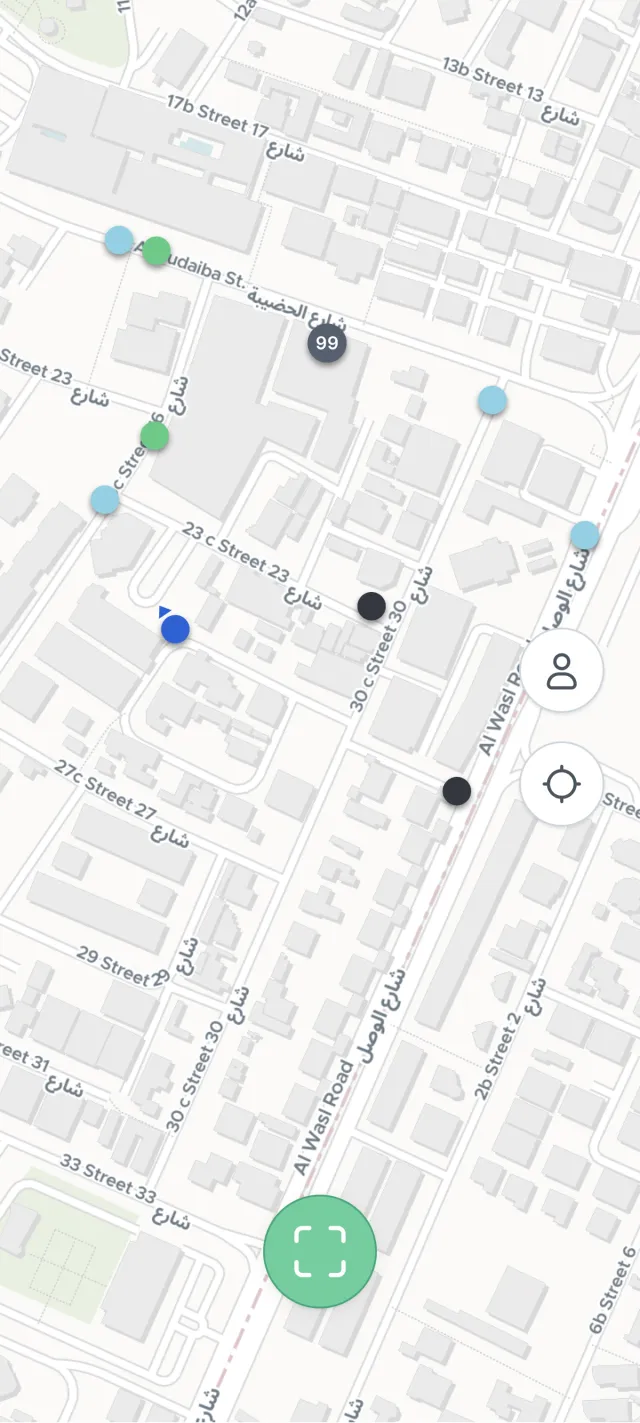
The courier app solves a deceptively simple problem: help riders find available units and start their shift in under two minutes.
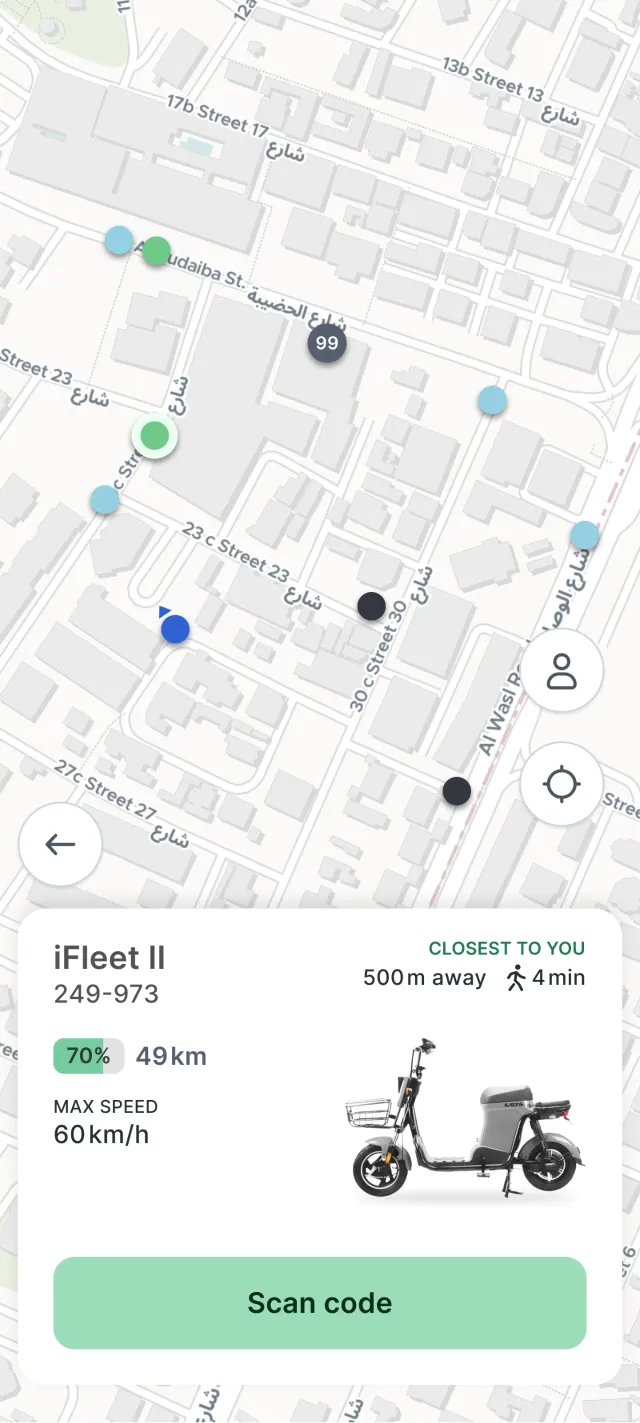
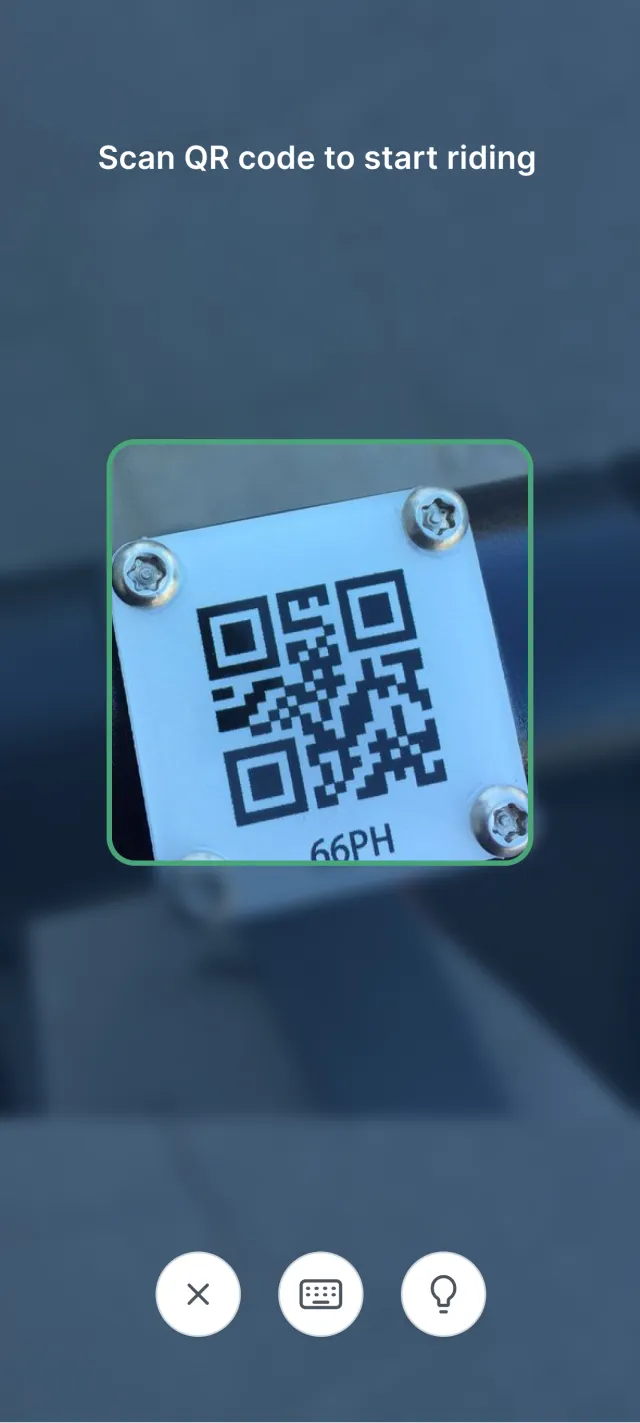
Six screens, each with a single job:
- Available fleet search — map view of nearby available units, filterable by type
- Unit card — condition, last service date, and reported issues before accepting
- Rental start flow — QR scan or manual ID entry to claim a unit
- Route and navigation — active rental view with destination input
- End-of-shift flow — return with condition confirmation and handoff documentation
- One-tap issue reporting — flag a problem with an optional photo; the report lands in the technician queue
The last feature closed the most common operational breakdown: couriers knew about problems but had no easy way to report them. Issues went unreported, units stayed broken, customers complained. One-tap reporting closed that loop.
Tech stack
Backend:
- Node.js + NestJS — modular architecture built for extension
- PostgreSQL — transactional data: rentals, service events, user actions
- WebSocket — real-time unit status updates across connected clients
- MQTT — IoT telemetry for GPS tracker data ingestion
Mobile (courier + technician apps):
- React Native — single codebase for iOS and Android
- Offline-first architecture with a local SQLite cache
Web (B2B dashboard + admin panel):
- React + TypeScript
- Mapbox GL — interactive fleet map with real-time unit positions
Infrastructure:
- AWS (EC2, RDS, S3)
- GitHub Actions CI/CD — automated testing and deployment
Development process: 90 days to MVP
Week 1–2 — Discovery. Workshops with the SWAPPZ team to map every operational scenario. Role definitions, permission matrix, feature prioritisation. Output: a technical specification that stayed stable during development.
Week 3–4 — Design and architecture. UX prototypes for all five role interfaces. Database schema. Infrastructure setup and CI/CD pipeline.
Week 5–10 — Development. Parallel work on backend, mobile apps, and web dashboard. Weekly demos with the client. Feedback absorbed in the same sprint — no backlog pile-up.
Week 11–12 — QA and launch. Field testing with a pilot group of technicians and couriers in real Dubai conditions. Load testing on real-time components. Staged rollout to the full fleet.
03. Result
Released in 90 days with full fleet transparency and a measurable reduction in downtime and theft incidents.
The system launched on schedule, within scope, and without architectural rework. Three months from the first workshop to a live fleet management platform handling real operations across Dubai.
What changed operationally:
- Fleet owners moved from phone calls and spreadsheets to a real-time dashboard — complete visibility in under 30 seconds
- Technician response improved — dispatched with full unit history, not arriving blind
- Courier shift start dropped from 15–20 minutes of manual searching to under 2 minutes
- Theft response became possible — real-time geofencing alerts for the first time
- Investor reporting moved from monthly manual summaries to on-demand dashboard exports
What the architecture enables going forward:
The system was built to scale. Adding new cities, vehicle types, or operator accounts is a configuration change — not a rebuild. SWAPPZ can expand operations without growing the engineering team in lockstep.
From zero to full fleet control in 90 days: five roles, real-time GPS, and one source of truth for Dubai operations.Need a similar system?
If you manage a fleet of vehicles, equipment, or other physical assets — and current tools do not give the control you need — we are ready to discuss requirements.
WAPP builds custom fleet management software for logistics companies, mobility operators, and industrial businesses. Approach: deep process analysis first, then engineering.
Discuss your project — logistics hub, fleet solutions, or submit a request.